
A CV website template can be a great way to showcase your skills and make your professional profile more discoverable online, beyond traditional social media platforms. Unlike a traditional resume, a personal CV website gives you more freedom to present your experience, projects, and achievements in one place. It can also help potential clients discover your services if you work as a freelancer, or make it easier for recruiters and headhunters to find you when looking for new talent.
A personal CV website can also complement your LinkedIn profile rather than replace it. While LinkedIn provides a platform for networking and professional connections, your own website gives you more control over your presentation, allows you to showcase detailed work samples, and creates another way for potential clients or employers to discover you. You don’t always need to pay for separate hosting and a domain, as several free options are available.
In this article, I’ll explain why you should consider creating an online CV instead of relying solely on a traditional PDF resume. I’ll also cover the essential information to include on your website. Finally, I’ll share some of my favorite CV website templates for Carrd and Framer.
Why Create a CV Website Instead of Traditional PDF?
A traditional PDF resume is still useful when applying for jobs, but a personal CV website offers additional opportunities to present your professional profile and reach a wider audience.
– Greater Online Visibility: A website can appear in search engine results, giving potential employers, recruiters, and clients another way to discover your professional profile.
– More Freedom to Present Your Work: Unlike a standard PDF, a website allows you to combine text, images, videos, project galleries, and interactive elements to showcase your skills and experience.
– A Complement to LinkedIn: Your website gives you more control over your professional presentation while complementing your LinkedIn profile and networking activities.
– More Opportunities for Freelancers: If you offer services independently, your CV website can also work as a simple portfolio and a place where potential clients can learn about your services and contact you.
– Easy to Update and Share: You can update your experience, projects, and contact details without creating and sending a new PDF every time. You can also share one link across social media, email signatures, and job applications.
– Your Own Professional Identity: A custom domain and individual website design help you build a recognizable online presence that is not tied to a single platform.
– Flexible and Affordable Options: You don’t necessarily need to invest in expensive hosting or web development. Platforms such as Carrd and Framer offer accessible ways to create a personal website, including free starting options.
– Especially Useful for Creative Professionals: If your work involves visual or tangible projects, a personal CV website gives you space to showcase examples rather than simply describe your skills. Designers, photographers, architects, developers, and other creatives can include project galleries, case studies, videos, and links to published work. Writers, journalists, and researchers can also use it to collect links to articles, publications, and other contributions.
– Not Essential for Every Profession: A personal website isn’t necessary for every career. If your qualifications, certifications, and work experience are best communicated through a traditional resume, a PDF and LinkedIn profile may be sufficient. A website is most useful when it provides additional information or examples that are difficult to present in a standard CV.
What to Include in a Professional CV Website
Here are some important features and sections your online CV website template should include. You don’t necessarily need all of them, as the right combination depends on your profession and what you want to achieve with your website.
1. Introduction and Professional Summary
Start with a short introduction that tells visitors who you are, what you do, and what you specialize in. Include your name, professional title, and a brief summary of your experience or expertise. You can also add a professional photograph to make your website more personal.
2. Work Experience
Present your professional background, including previous positions, employers, and relevant responsibilities. Focus on experience that supports your current career goals rather than listing every job you’ve ever had.
3. Skills and Expertise
Highlight your most relevant professional skills, tools, and areas of expertise. You can organize them into categories to make the information easier to scan.
4. Education and Certifications
Include your academic background, relevant courses, professional training, and certifications. This section can be particularly important for academic, technical, and specialized professions.
5. Portfolio and Selected Projects
If your work involves creating tangible or visual results, include a portfolio with selected projects. Designers, photographers, architects, and developers can use images, galleries, and case studies to demonstrate their skills. Writers, journalists, and researchers can link to published articles, publications, and other contributions.
6. Services and Specializations
If you work as a freelancer or independent professional, consider adding a section describing the services you offer. Explain what you specialize in, who you work with, and how potential clients can benefit from your expertise.
7. Testimonials and References
Include selected testimonials from previous clients, employers, or colleagues. Positive feedback can help establish credibility and give visitors a better understanding of what it’s like to work with you.
8. Contact Information and Social Links
Make it easy for visitors to reach you. Include your professional email address and links to relevant platforms such as LinkedIn, GitHub, Behance, or other industry-specific profiles.
9. Clear Call-to-Action Buttons
A good CV website should make the next step clear. Add a visible call-to-action (CTA) button that encourages visitors to contact you or explore your work further. The wording can depend on your professional goals. For example, you could use Contact Me, Get in Touch, or Download My CV if you’re looking for employment. Freelancers and independent professionals might prefer Work With Me, Hire Me, or Request a Quote.
Best CV Website Templates
In this section, I’ve selected five CV website templates: two built with Carrd and three with Framer. Most of them are designed for creative professionals and developers. Some feature a clean, minimalist layout, while others lean towards an editorial, magazine-inspired aesthetic that may appeal to artists, photographers, and graphic designers.
CV 2.0 Free – Carrd

CV 2.0 Free is a humorous, single-page CV template built with Carrd. It uses a straightforward layout with a name and professional tagline at the top, followed by an introduction, skills, work experience, and achievements.
The template includes a navigation menu in the header, while buttons within individual sections link visitors to the next relevant part of the page. This creates a guided browsing experience without requiring visitors to scroll through the entire CV without direction.
The free CV website template version is shorter than the paid one and does not include the animated or video background featured in the paid version’s header. However, its layout remains functional on mobile devices, making it a practical starting point for a simple personal CV website.
The demo uses deliberately exaggerated, humorous placeholder content. You can replace it with your own professional summary, experience, skills, education, and achievements. This makes the template particularly easy to adapt if you like its structure but prefer a more conventional presentation.
Terminal – Carrd ($5)

Terminal is a minimalist Carrd portfolio template designed primarily for software developers, engineers, and freelancers. Unlike a traditional CV layout, it puts greater emphasis on practical experience and completed projects.
The template opens with a personal introduction, professional title, availability status, and contact links. Its main section features project case studies with descriptions, technology stacks, budgets, timelines, and results. It also includes space for client testimonials, an About section, and a categorized overview of technical skills.
Terminal is particularly suitable for developers who want to showcase their work rather than simply list previous positions and qualifications. Freelancers can also use its contact and booking buttons to encourage potential clients to schedule a consultation.
The layout displays well on mobile devices. One minor issue in the demo is a duplicated copy of the introductory header near the footer. You can remove this section when customizing the template.
Kima – Framer
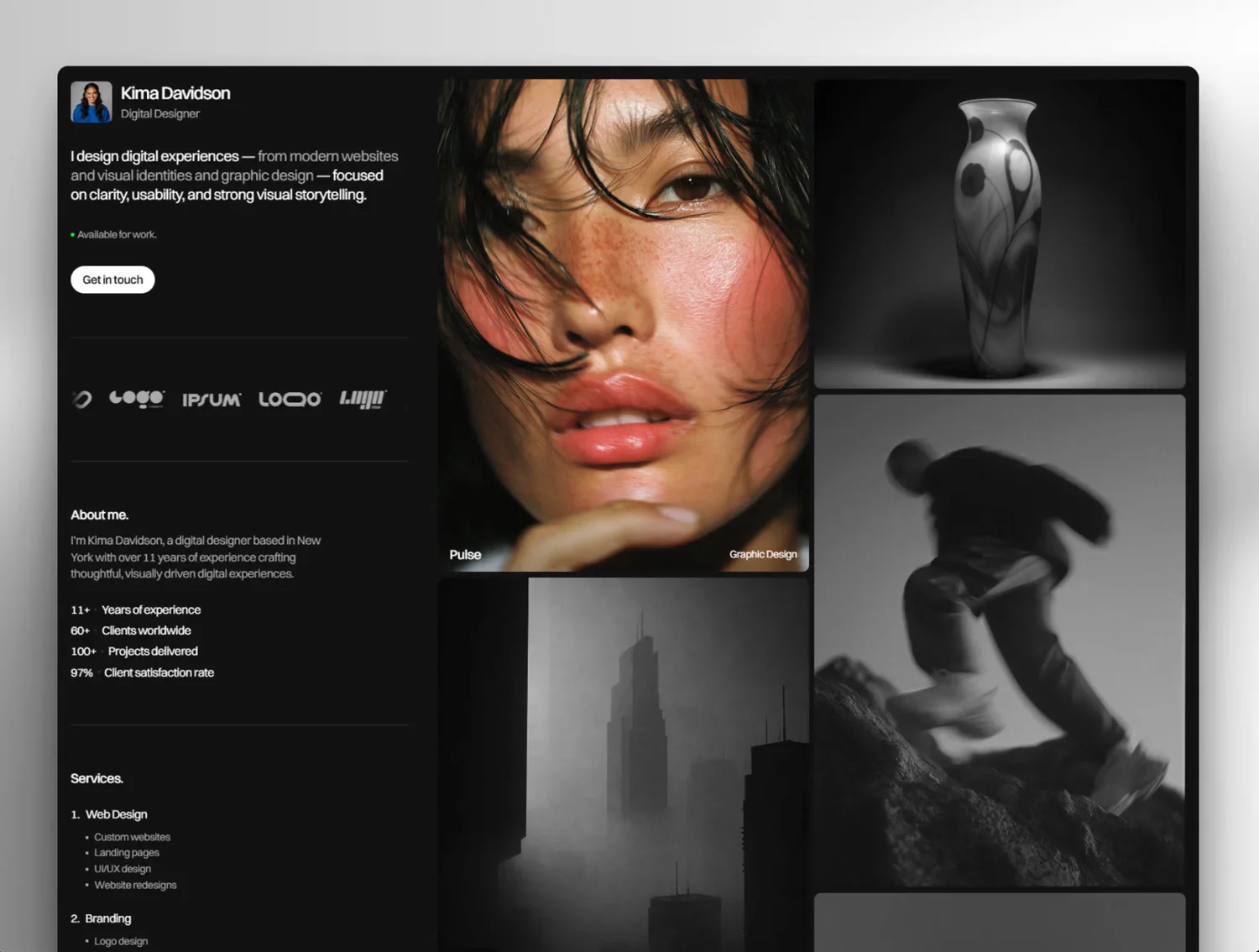
Kima is a free Framer portfolio template with an editorial-inspired layout. It is particularly well suited to digital designers, photographers, and other creative professionals who want to combine a personal CV with a visual portfolio.
On desktop, the layout features two independently scrolling columns. The left side contains the navigation and professional information, including an introduction, services, skills, experience, awards, and contact details. The right side showcases large project images in a visually engaging gallery. Clicking a project opens a dedicated page with its own layout, featuring project information on the left and visual content on the right.
Kima also works well on mobile devices. The two-column desktop layout adapts into a vertical presentation, with the introduction and personal information appearing before the project images. Individual project pages follow a similar responsive structure.
Beyond its distinctive layout, the template includes a CMS collection for projects, video support, a masonry-style gallery, and light and dark themes. Its visual approach makes it a particularly good choice for creatives who want their work to take center stage without sacrificing the essential information found on a traditional CV website.
Taylor – Framer
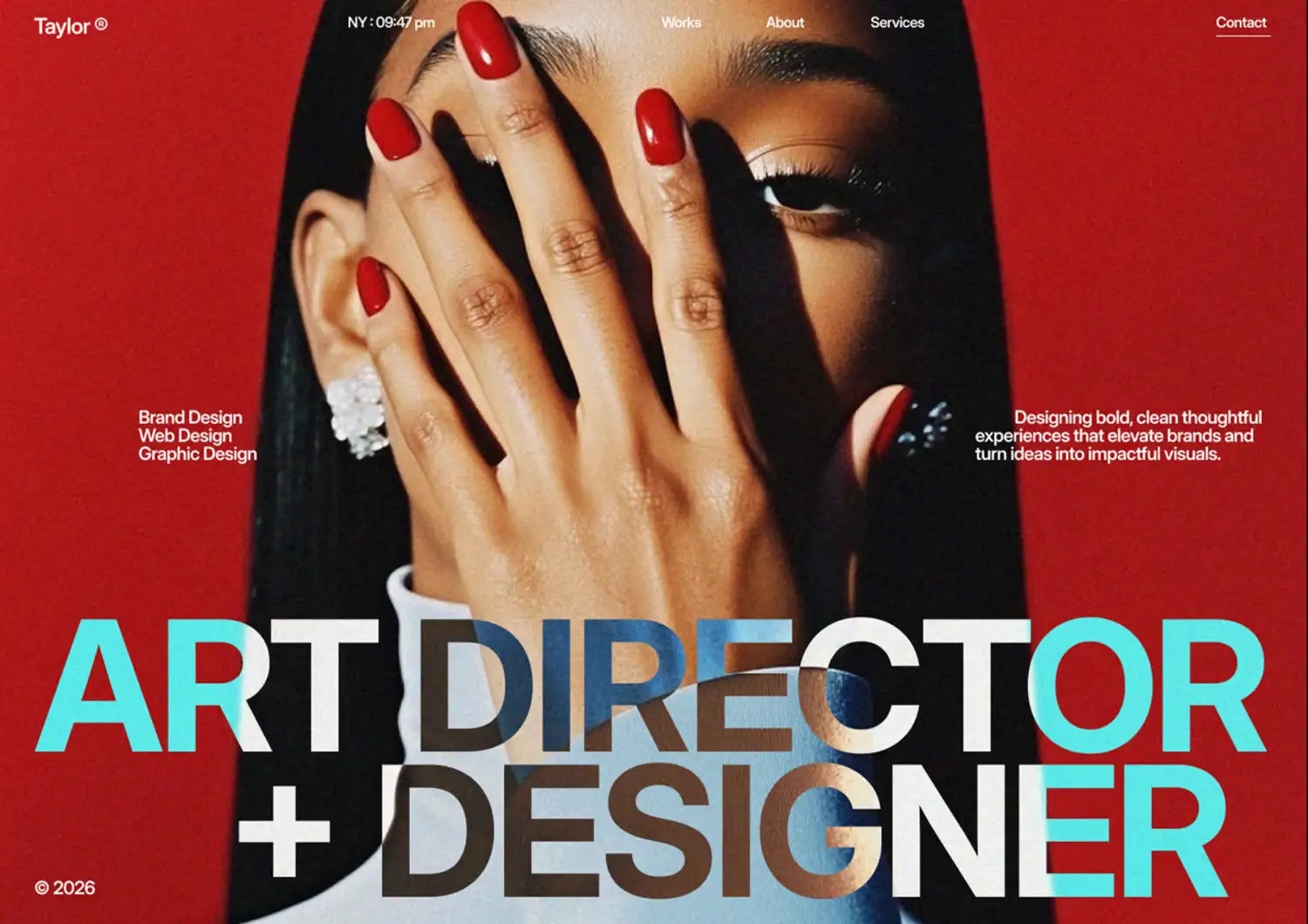
Taylor is a free Framer template with an editorial, magazine-inspired design. It is particularly suitable for art directors, graphic designers, photographers, and other creative professionals who want a visually distinctive online portfolio.
The homepage opens with a bold introduction and a clear navigation menu linking to the main sections. Instead of presenting a conventional CV, it uses a magazine-like structure to showcase selected projects, services, and the creative process. It also includes an About section, client testimonial, statistics, and a blog section for publishing articles or design insights.
The selected works section features a visual project gallery with individual categories for branding and web design. This gives visitors a quick overview of your work while keeping the presentation clean and image-focused. The services and process sections are particularly useful for freelancers and creative studios who want to explain their approach to potential clients.
Taylor also adapts well to mobile devices, where its editorial layout becomes a more vertical browsing experience. Overall, it is a good option if you want your CV website to feel more like a creative portfolio or studio presentation than a traditional resume.
Folioxa – Framer
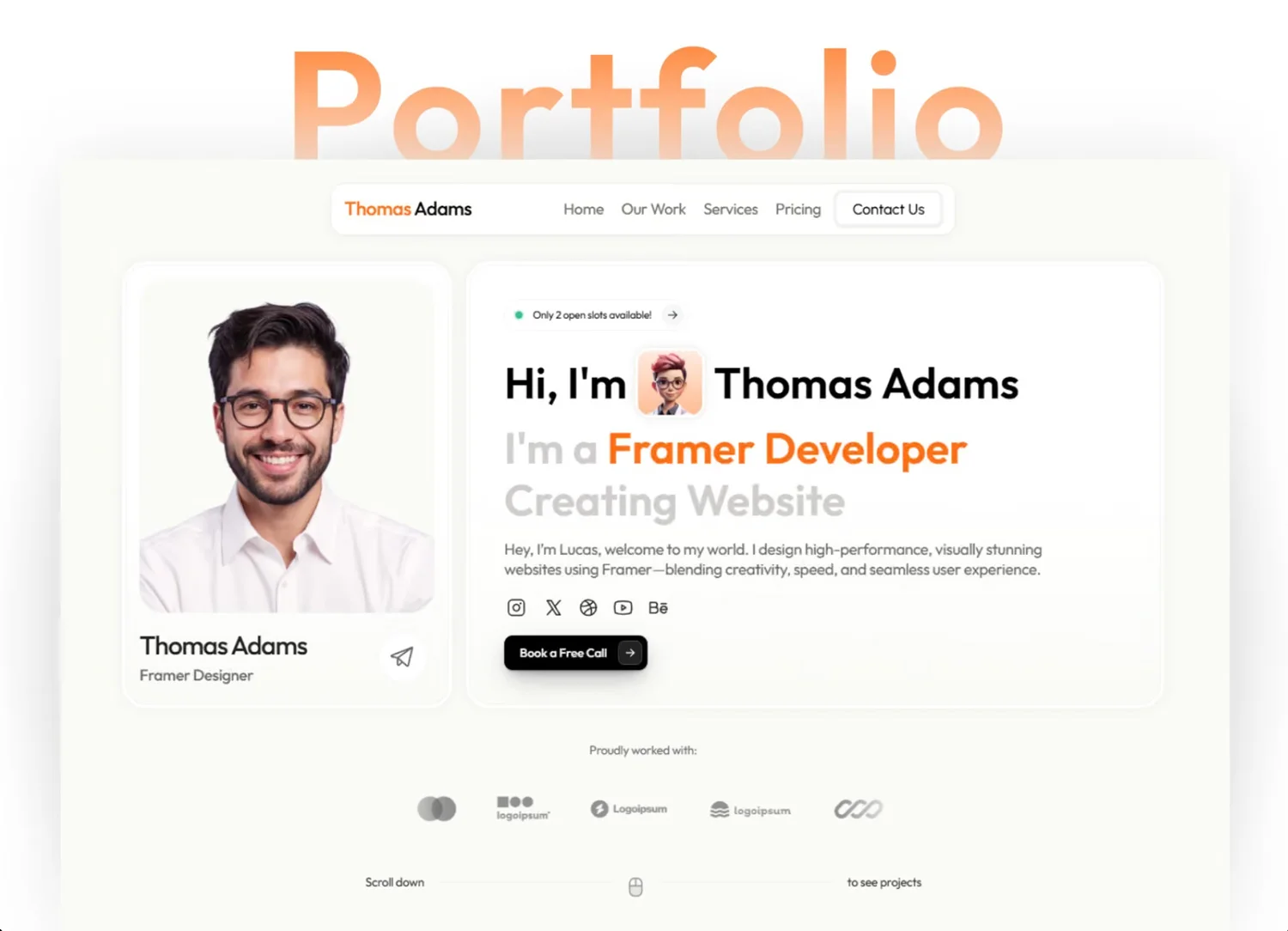
Folioxa is a free Framer template designed for freelancers, digital creators, and web developers. At first glance, it looks like a single-page portfolio, but it also includes several dedicated subpages for projects and contact information.
The homepage features a bold introduction, animated visual elements, and a gallery of recent projects. Visitors can explore individual projects on separate pages, while the contact page provides another way to get in touch. The template also includes sections for services, skills, awards, testimonials, and frequently asked questions.
One feature that sets Folioxa apart from the other templates in this selection is its pricing section. Freelancers can use it to present service packages and give potential clients an overview of their rates. This makes the template suitable not only for showcasing previous work but also for promoting services and generating enquiries.
Folioxa uses subtle animations and transitions throughout the website to make browsing more engaging. It is also fully responsive, making it suitable for visitors accessing the portfolio on mobile devices.
How to Choose Between Carrd and Framer
Choosing the right platform for your CV website depends on your experience with website building, the type of website you want to create, and how much control you need over its design. If you’ve never built a website before, starting with a simple website builder can save you time and make the process less overwhelming. Here are some differences between Carrd and Framer to help you decide.
Carrd: Best for Beginners and Simple CV Websites
Carrd is a good starting point if you’ve never built a website before and want to create a professional online CV without dealing with complicated settings or technical requirements.
Its interface is relatively straightforward, and you can build a responsive one-page website using pre-designed elements and sections. You don’t need coding knowledge or previous web design experience to get started.
Carrd is particularly suitable for:
- People creating their first personal website.
- Job seekers who need a simple online CV.
- Freelancers who want to present their services and contact information.
- Creatives who need a basic portfolio with selected projects.
- Anyone looking for an affordable and relatively easy website-building solution.
I’ve also noticed that Carrd has become popular among independent artists and creatives who use it to showcase their work and create simple online portfolios. Its minimalist approach makes it suitable for visual presentations on the go where the work itself takes center stage.
Framer: Best for More Advanced and Customizable Websites
Framer offers more design flexibility and advanced customization options. It is particularly useful if you want to create a more elaborate personal website, combine your CV with a portfolio, or build a distinctive visual identity.
However, its greater flexibility also means a steeper learning curve. Although you don’t need to write code to build a website in Framer, some familiarity with web design concepts, responsive layouts, typography, and website structure can make the process much easier.
Framer is particularly suitable for:
- UX/UI and web designers.
- Developers and other technology professionals.
- Creative professionals who want more control over their website’s appearance.
- Freelancers who need a more comprehensive portfolio with some additional special effects.
- People who want to build a custom personal brand website rather than a simple online resume.
What About Other Website-Building Platforms?
Carrd and Framer aren’t the only options for creating a personal website. You might also come across platforms such as Canva, Google Sites, and Notion.
- Canva: Canva offers a simple website builder, which can be useful for basic personal pages. However, its design approach is more focused on visual layouts than building a fully customizable website. If you use Canva, pay particular attention to how your website looks and functions on mobile devices.
- Google Sites: A beginner-friendly option for basic informational websites. However, its design and customization options are relatively limited, which can make it harder to create a distinctive professional presentation.
- Notion: Notion is primarily a workspace for organizing documents, notes, and information rather than a dedicated website builder. You can publish Notion pages online, but the design and layout options are more limited compared with dedicated website-building platforms.
Which One Should You Choose?
If you’re building your first CV website, I’d recommend starting with Carrd. It offers a relatively simple way to create a professional-looking online presence without requiring previous website-building experience.
If you’re already familiar with web design or want more creative freedom, Framer is worth exploring. It offers more possibilities for building a personalized website that combines your CV, portfolio, and professional identity.
| Feature | Carrd | Framer |
|---|---|---|
| Beginner-friendly | Excellent | Moderate |
| Design flexibility | Basic to moderate | Advanced |
| One-page CV | Excellent | Excellent |
| Portfolio websites | Basic | Advanced |
| Coding required | No | No |
| Learning curve | Low | Higher |
Final Words
Creating a personal CV website can help you present your professional experience, skills, and projects in a more engaging way. Whether you choose Carrd or Framer depends on your design preferences, technical experience, and the type of portfolio you want to build. Carrd is a great starting point for simple, affordable one-page websites, while Framer offers more creative freedom and advanced layouts.