

Carrd is a simple online website builder that lets you create mobile-friendly websites, usually one-page sites. People use it for landing pages, portfolios, email sign-ups, link-in-bio pages, personal websites, and small business sites. Carrd is easy to use, but it is also quite flexible, and you can start building a website for free.

What Is Carrd?
Carrd started as a side project by AJ, a web designer and developer from Tennessee, USA. One of the ideas behind Carrd was the DIY principle: making it possible for people to create their own simple websites without having to learn how to code or hire a developer.
Instead of trying to be an all-purpose website platform, Carrd focuses mainly on simple, one-page websites. This makes it particularly useful for portfolios, landing pages, online profiles, link-in-bio pages or storefronts, and other small websites where you don’t need dozens of separate pages.
Carrd is a website builder that lets you drag and drop different website elements inside its online editor. You don’t have to know how to code, although there are options for adding custom code if you want something more advanced.
Another useful feature is responsive design. You can check how your website looks on different screen sizes directly in the editor, including mobile view. You can also adjust certain elements specifically for mobile devices, which gives you more control over the final design.
Less complexity. More focus.
What Is Carrd Used For?
As I have mentioned earlier, there are several use cases where this type of website builder can be a good fit. Here are some of the most common ones.
Portfolio Websites
Simple one-page sites that you can build yourself are ideal for small-business owners, artists, photographers, designers, and content creators.
The process of learning how to use the Carrd editor is relatively fast and straightforward. You can also use one of the existing Carrd templates as a starting point and turn it into your desired design instead of building everything from scratch.
For example, a photographer can use Carrd to present selected work, add a short introduction, link to social media, and give potential clients a way to get in touch.
Link-in-Bio Pages
Today, it is common for people active on social media to use a simple link-in-bio page to share their active online accounts and other important links.
Many dedicated link-in-bio services use similar layouts, where you make a few changes to an existing structure. Carrd gives you more creative freedom because you can design the page yourself instead of being limited to one particular type of profile layout.
This makes Carrd useful if you want your link-in-bio page to feel more like a small personal website than just a list of links.
Landing Pages
Another common use for Carrd is a landing page. These websites rely on a one-page presentation where all the important information is available in one place.
Landing pages can be used to present an app, product, service, special offer, newsletter, campaign, or another project where you don’t necessarily need a complete multi-page website.
Personal Pages
A personal page doesn’t necessarily have to be business-related. What is great about Carrd is the amount of creative freedom it gives you.
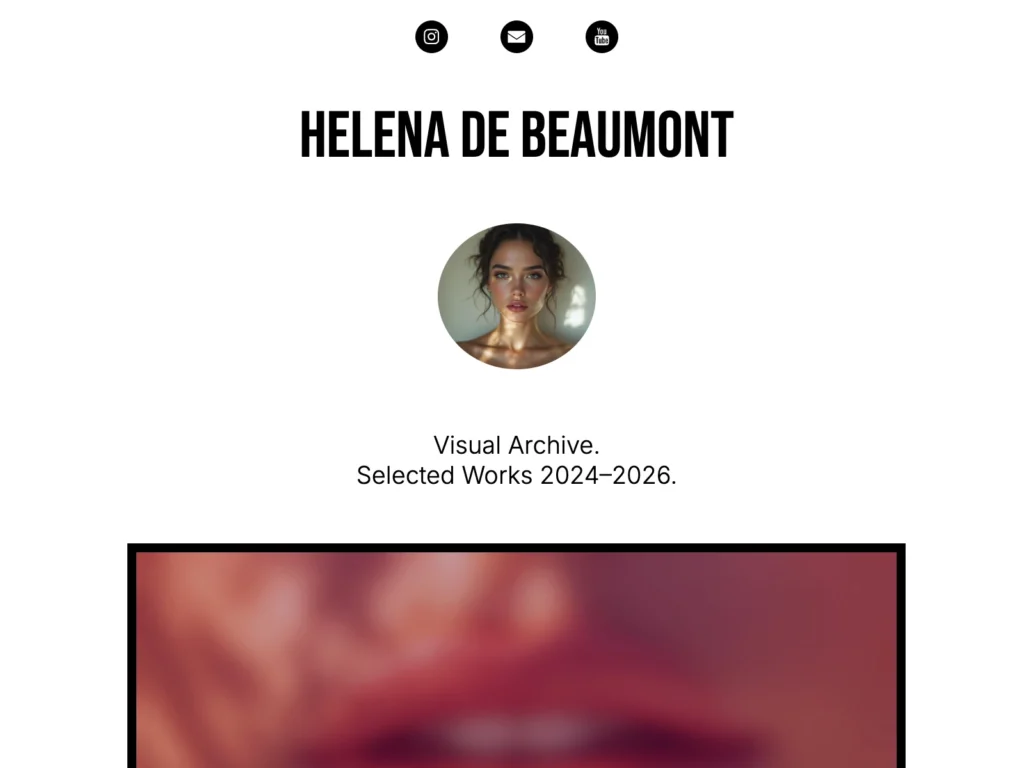
You can notice that it is often used by artists and people who want their website to feel more personal or experimental. There are also online communities that share very specific Carrd aesthetics, where the website can feel more like an art expression than another sales page or generic-looking portfolio.
Small Business Websites
For many small business owners, managing their online presence can be challenging. Hairdressers, plumbers, make-up artists, dentists, freelancers, and other service providers may not have a big budget or much time to build and maintain a complicated website.
For them, a simple Carrd website can be a good fit. Especially when using a pre-made template, they can make a few changes, add their information, publish the site, and concentrate on their primary business instead.
How Does Carrd Work?
Carrd is a simple but quite powerful online website builder. You can start by creating an account and then choose whether you want to use a template or start from scratch.
From there, you can add sections, images, buttons, forms, email sign-ups, and other elements. If you want to experiment further, Carrd also gives you the option to use custom code.
You don’t need to understand all of these features when you are starting out. The basic editor is relatively easy to learn, and you can gradually explore more options as your website becomes more complex.
What Can You Create With Carrd?
I have already touched on some of the main uses for Carrd. Here is a compact overview:
| Website type | Good for |
| Portfolio | Photographers, designers, creatives |
| Landing page | Products, services, campaigns |
| Link in bio | Creators and social media profiles |
| Personal website | About pages, resumes, personal brands |
| Small business site | Simple service-based businesses |
What Makes Carrd Different?
One of the main advantages of Carrd is that it doesn’t try to do everything.
If you only need a simple website, you don’t necessarily need a platform with hundreds of features, plugins, integrations, and settings. Carrd focuses on creating a small website quickly and keeping it relatively easy to manage.
This can be especially useful if your website is mainly there to present your work, explain what you do, collect inquiries, or send visitors to other platforms.
At the same time, this focus is also Carrd’s main limitation. If you need a large website with many pages, a complex online store, or a content-heavy blog, you may eventually need a different platform. For smaller sites, learning the SEO basics can help you make the most of Carrd.
Is Carrd Free?
Yes, Carrd offers a free plan. You can use it to create websites without paying for a subscription, although some features are available only with paid plans.
Depending on the plan, you can get access to features such as custom domains, forms, widgets, embeds, analytics, custom meta tags, local fonts, redirects, and password protection.
If you are trying to decide whether the free version is enough for you, I cover the different options in more detail in my Carrd pricing guide.
Sometimes, one page is all you need.
Carrd vs. Traditional Website Builders
Carrd is best when you want a simple, fast, one-page website that is affordable and easy to maintain. But if you are considering a more traditional website builder, Carrd may not be the best choice if:
- You need dozens of pages
- A blog and content-heavy SEO strategy are central to your website
- You need a complex ecommerce site
- You need advanced functionality or extensive integrations
Carrd is not always the best solution for everyone. If you intend to grow your business into a large online store or content-heavy website, you may eventually need another platform.
But if a simple website or a page connecting visitors with your other online services and platforms is enough, Carrd can be a very practical option.
Who Is Carrd Best For?
The most common Carrd users will probably include:
- Photographers
- Designers
- Freelancers
- Creators
- Small businesses
- Musicians and artists
- People who need a simple landing page
They usually use the site to showcase their work or online presence without needing anything particularly complicated.
For example, a photographer might use Carrd as a portfolio while keeping client bookings, payments, print sales, or other services on separate platforms.
Conclusion
In general, Carrd is a simple online website builder that lets you create a website without having to code. Anyone looking for an easy tool that can be learned relatively quickly may find Carrd a good fit.
But if you are aiming for something bigger, it is worth considering other platforms first. Carrd can be a great starting point for learning how websites work and for creating a simple online presence, but from a business perspective, it may not always be suitable for every purpose.
Simple websites can still make a strong first impression.